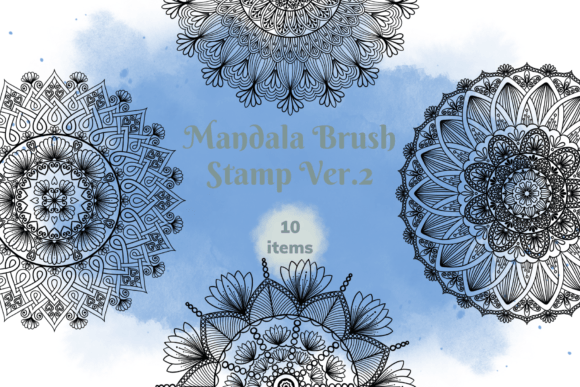
Evaluating the Mandala Brush Stamp Ver. 2 for Digital Creators
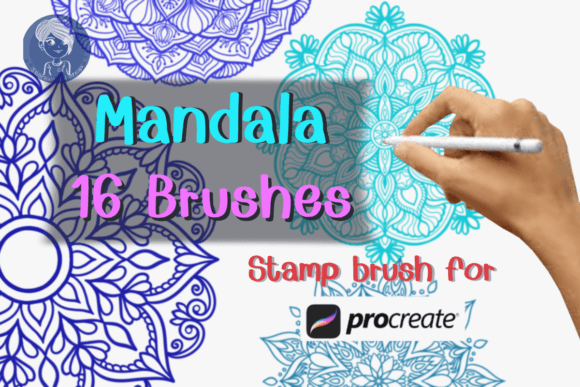
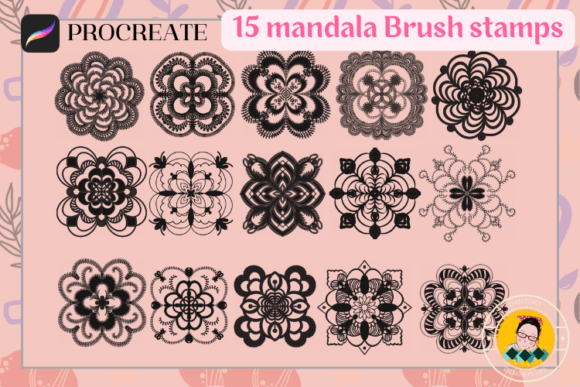
In the landscape of digital illustration and graphic design, efficiency often dictates the difference between a completed project and an abandoned one. For professionals and serious hobbyists using the Procreate app on iPad, the Mandala Brush Stamp Ver. 2 represents a specific utility tool designed to streamline the addition of complex geometric patterns without sacrificing artistic control. This resource is not merely a collection of decorative elements; it is a functional asset pack containing ten distinct mandala stamp brushes, accompanied by a swatch file with thirty color options. The primary value proposition lies in its ability to transform intricate, time-consuming manual drawing tasks into instant, scalable applications, allowing creators to focus on composition and color theory rather than repetitive line work.
Understanding the Core Functionality
The Mandala Brush Stamp Ver. 2 operates on a straightforward principle: selection and placement. Unlike traditional brush engines that require continuous pressure or stylus movement to render a stroke, these tools are configured as stamps. Once selected within the Procreate interface, the user can position the cursor anywhere on the canvas and tap to "stamp" the image. This mechanism ensures perfect consistency every time the pattern is applied. Whether you need a single accent in the corner of a digital planner page or a repeating background texture for a t-shirt design, the output remains identical in shape and detail.
What distinguishes this version from generic clip art is its integration directly into the brush engine. Because these are native Procreate brushes, they inherit the full suite of layer controls available in the application. Users can adjust opacity, blend modes, and flow settings instantly. Furthermore, the included bonus of thirty color swatches provides immediate access to a curated palette, reducing the friction of color matching when integrating these designs into existing projects. The set is delivered as a single .brushset file, ensuring a seamless import process that requires no third-party conversion software.
Practical Applications Across Industries
The versatility of the Mandala Brush Stamp Ver. 2 extends well beyond simple doodling. Its practical utility is evident across several professional and creative workflows:
- Digital Planning and Bullet Journaling: For educators and productivity enthusiasts who maintain digital bullet journals, these stamps offer a rapid way to create headers, section dividers, and decorative borders. The ability to resize the stamp allows for flexible layout adjustments, ensuring that the ornamentation complements the text rather than overwhelming it.
- Product Design and Merchandise: Entrepreneurs creating designs for mugs, shirts, or tote bags often struggle with scaling vector-like graphics in raster-based apps. These stamps provide high-resolution geometric shapes that hold up well when resized for print-on-demand services, provided the final export resolution is sufficient.
- Sticker Creation: Digital sticker artists frequently rely on consistent motifs to build cohesive collections. Using the Mandala Brush Stamp Ver. 2 allows for the quick generation of base shapes that can be further embellished with hand-drawn details, significantly speeding up production times for Etsy shops or social media content.
- Graphic Decoration: Marketers and designers working on social media assets can use these elements to add visual interest to flat graphics, breaking up large areas of negative space with structured, organic geometry.
Technical Specifications and Compatibility
A critical aspect of evaluating any digital asset is understanding its technical constraints. The Mandala Brush Stamp Ver. 2 is strictly built for the Procreate ecosystem. It requires Procreate App Version 5.0 or higher to function correctly. This version threshold ensures that the brush engine supports the necessary stamp mechanics and alpha channel behaviors required for clean rendering.
It is important to note a significant limitation: these brushes do not work in Adobe Photoshop, Clip Studio Paint, or other desktop or mobile applications. They are proprietary to the Procreate format (.brushset). For teams operating in a mixed environment where some members use desktop software, this asset will require a workaround, such as exporting the stamped images as PNG files with transparent backgrounds for use elsewhere. However, for the dedicated iPad workflow, this exclusivity is rarely a hindrance and often ensures optimized performance.
Usability and Workflow Integration
From a usability standpoint, the learning curve for the Mandala Brush Stamp Ver. 2 is negligible. The workflow is intuitive: select the brush, choose a color (or utilize the included swatches), adjust the size slider to fit the canvas context, and stamp. This simplicity is a strength, particularly for users who may not possess advanced freehand drawing skills but wish to incorporate sophisticated mandala patterns into their work.
The flexibility of the tool is enhanced by the fact that each stamp acts as a standard brush stroke. This means that after stamping, the user can immediately apply Procreate's transformation tools—such as rotate, warp, or distort—to modify the shape slightly if a unique variation is needed. Additionally, because the strokes exist on layers, creators can easily isolate specific stamps, change their colors independently, or apply effects like blur or sharpen without affecting the rest of the artwork. This level of non-destructive editing is essential for professional-grade output.
Quality Assessment and Long-Term Value
When analyzing the quality of the ten included stamps, the focus is on clarity and scalability. High-quality digital stamps must retain crisp edges even when enlarged significantly. The Mandala Brush Stamp Ver. 2 appears designed with this in mind, offering clean lines that do not pixelate prematurely at standard screen resolutions. The variety within the set is also a key factor; having ten distinct shapes prevents the repetition fatigue that often occurs when a creator relies on a single motif.
The inclusion of the thirty-color swatch file adds tangible long-term value. Curated color palettes save hours of trial and error, providing a starting point for harmonious color schemes. For freelancers and small business owners, time is a currency; tools that reduce setup time directly impact profitability. By streamlining the decoration phase of a project, this brush set allows for faster turnaround times on client deliverables or personal creative goals.
Who Benefits Most?
The Mandala Brush Stamp Ver. 2 is ideally suited for a specific demographic of digital creators. It is most beneficial for:
- Freelance Illustrators: Those who need to produce high volumes of work, such as coloring book pages or greeting cards, where consistent pattern usage is required.
- Digital Planners: Individuals selling or using digital planners who need aesthetic elements that align with specific themes without spending days drawing them manually.
- Small Business Owners: Entrepreneurs designing their own merchandise who need reliable, repeatable graphics for branding purposes.
- Hobbyists: Serious hobbyists who want to elevate the look of their digital art but lack the patience or skill to draw complex mandalas from scratch.
Conversely, this tool may not be suitable for artists seeking highly organic, imperfect textures. Stamps, by definition, offer perfection and symmetry. If a project demands a rough, hand-sketched aesthetic, these brushes should be used sparingly or combined with textured brushes to break up the uniformity.
Final Considerations
In conclusion, the Mandala Brush Stamp Ver. 2 serves as a robust, efficient addition to a Procreate artist's toolkit. It addresses the common pain point of time consumption in detailed pattern creation, offering a solution that balances speed with aesthetic quality. While its compatibility is limited to the Procreate app, its functionality within that environment is precise and reliable. For professionals and enthusiasts looking to enhance their digital planners, stickers, or product designs with elegant, geometric flourishes, this set provides a practical, cost-effective, and time-saving resource. It is not a replacement for creativity, but rather a lever that amplifies the creative process, allowing the artist to focus on the broader vision of the project.