Evaluating the Procreate Texture Brush Pack for Digital Artists
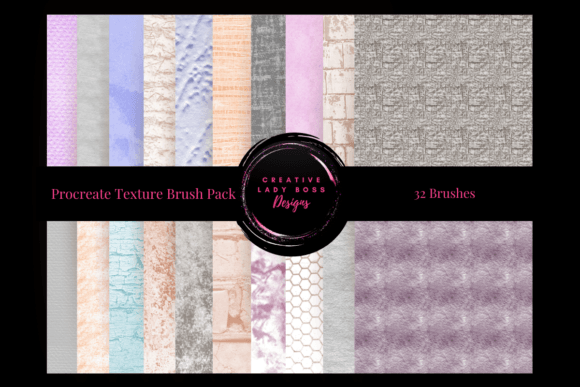
In the evolving landscape of digital illustration, the tools an artist chooses often dictate the tactile quality of the final piece. The Procreate Texture Brush Pack represents a specific category of resources designed to bridge the gap between vector smoothness and organic imperfection. This collection, containing 32 highly-detailed and versatile brushes, is engineered specifically for the Procreate app on iPad. For artists, graphic designers, and hobbyists alike, the decision to integrate this pack into a workflow requires an understanding of its capabilities, limitations, and how it compares to other texturing methods available in the industry.
Understanding the Core Functionality of the Brush Pack
The primary distinction of the Procreate Texture Brush Pack lies in its optimization for texture generation without compromising performance. Unlike generic brush sets that may rely on heavy image stamps or complex algorithms that lag on older devices, these 32 brushes are tuned for the latest version of Procreate. They utilize grain settings, scatter, and wet mix dynamics to simulate traditional media such as charcoal, pastel, oil paint, and dry ink.
When evaluating this resource, it is essential to note that "texture" in a digital context can mean two things: surface roughness and material depth. This pack addresses both by offering brushes that react dynamically to pressure and tilt. For instance, a single stroke from one of the included brushes can vary from a faint, dusty line to a dense, saturated mark depending on the user's input. This versatility allows for a seamless creative process where the artist does not need to constantly switch tools to achieve subtle variations in tone and weight.
Comparing Custom Packs Against Default Options
Procreate comes with a robust set of default brushes that cover many basic needs. However, the Procreate Texture Brush Pack offers a level of specialization that the stock library often lacks. While default brushes are excellent for general sketching and clean coloring, they sometimes struggle to replicate the chaotic, unpredictable nature of physical media.
- Default Brushes: Prioritize speed and consistency. They are ideal for technical illustration, UI design, and clean character art where uniformity is key.
- Texture Brush Packs: Prioritize character and variation. They introduce noise, grain, and edge irregularities that give artwork a hand-crafted feel.
For an artist deciding between sticking with defaults or importing a specialized pack, the decision often hinges on the desired aesthetic. If the goal is a polished, commercial look, the default set may suffice. However, if the project demands a gritty, expressive, or painterly style, the Procreate Texture Brush Pack provides a distinct advantage. It reduces the time spent manually adding noise or adjusting layer effects to mimic texture, streamlining the workflow significantly.
Tradeoffs and Performance Considerations
While the benefits of high-fidelity textures are clear, there are tradeoffs to consider regarding device performance and file management. Textured brushes, by their nature, require more processing power than simple solid markers. On older iPads, using all 32 brushes simultaneously or on large canvases with high resolution might result in slight latency or reduced brush fidelity.
Furthermore, the complexity of these brushes means they are less suitable for tasks requiring absolute precision, such as lettering or hard-surface modeling. In scenarios where clean lines are paramount, the inherent grain of the Procreate Texture Brush Pack could be a hindrance rather than a help. Artists must weigh the desire for organic texture against the need for crisp edges. A balanced approach often involves keeping a hybrid toolkit: utilizing textured brushes for base layers, shading, and background elements, while reserving standard brushes for outlines and fine details.
Best-Fit Situations for the Collection
The Procreate Texture Brush Pack shines in specific artistic contexts where atmosphere and mood are central to the composition. It is particularly effective for:
- Concept Art and Environment Design: Creating landscapes, ruins, or atmospheric backgrounds where weathering and material decay are crucial storytelling elements.
- Pastel and Charcoal Portraiture: Simulating the soft blend of pastels or the scratchy intensity of charcoal without needing physical supplies.
- Mixed Media Collages: Integrating digital painting with scanned paper textures to create a unified, tactile look.
Conversely, this pack may not be the right choice for minimalist design, icon creation, or technical diagrams. In these fields, the visual noise introduced by textured brushes can distract from the clarity of the message. Understanding these boundaries helps artists avoid the common pitfall of forcing a tool where it does not fit, ensuring that the technology serves the art rather than dictating it.
Alternatives and Complementary Resources
While the Procreate Texture Brush Pack is a comprehensive solution, it is not the only path to achieving texture in digital art. Artists should remain aware of alternative approaches that might better suit their specific workflow or budget.
Manual Texture Creation
One alternative is creating custom brushes within Procreate itself. By scanning personal paper samples or generating noise patterns, an artist can build a unique library tailored exactly to their style. This method offers total control but requires a significant investment of time and technical knowledge regarding brush engine settings. For those who prefer ready-to-use solutions, the pre-made pack offers immediate value without the learning curve of brush engineering.
Layer Effects and Blending Modes
Another approach involves using flat colors combined with Procreate’s built-in layer effects, such as Grain, Noise, and Blend modes. This technique allows for non-destructive texturing, meaning the texture can be adjusted or removed at any stage without altering the underlying painting. While flexible, this method can sometimes lack the dynamic response of a dedicated texture brush, which reacts to stroke pressure and direction in real-time.
Third-Party Alternatives
The market offers numerous other brush sets, ranging from free community creations to premium professional collections. When comparing the Procreate Texture Brush Pack to these alternatives, factors such as organization, compatibility, and update frequency become relevant. Some free packs may contain outdated brushes that do not perform well on newer iPadOS versions, whereas optimized packs ensure stability and efficiency. Additionally, some competitors focus on niche styles (e.g., watercolor only), while a versatile pack like this one aims to cover a broader spectrum of textural needs.
Decision Factors for Potential Users
Before integrating the Procreate Texture Brush Pack into a workflow, potential users should evaluate their current limitations and goals. Ask yourself whether your current toolkit struggles to convey the materiality you envision. If you find yourself repeatedly searching for ways to add grit, grain, or depth to your work, a specialized texture pack is likely a logical next step.
Consider also the scale of your projects. If you produce high-volume content where consistency is key, the predictability of default brushes might be preferable. However, for illustrators working on unique pieces where individuality and artistic expression are paramount, the 32 diverse options in this pack provide the necessary range to experiment and refine a personal style.
Ultimately, the value of the Procreate Texture Brush Pack lies in its ability to expand the creative potential of the Procreate app. It is not a replacement for skill or vision, but rather a catalyst that removes technical barriers to achieving a specific aesthetic. By understanding its strengths, recognizing its limitations, and comparing it against other viable options, artists can make an informed decision that aligns with their professional standards and creative aspirations. Whether used as a primary toolset or a supplementary resource, these brushes offer a tangible way to elevate designs to the next level, provided they are applied with intention and awareness of their specific characteristics.