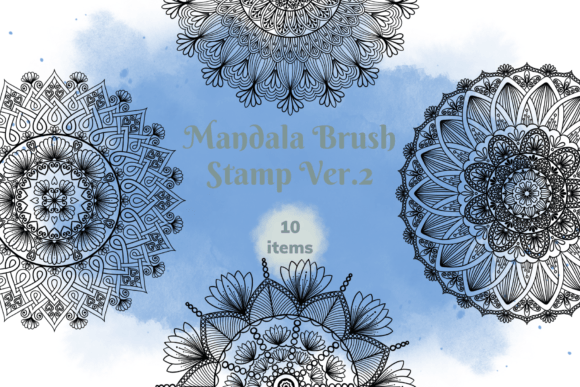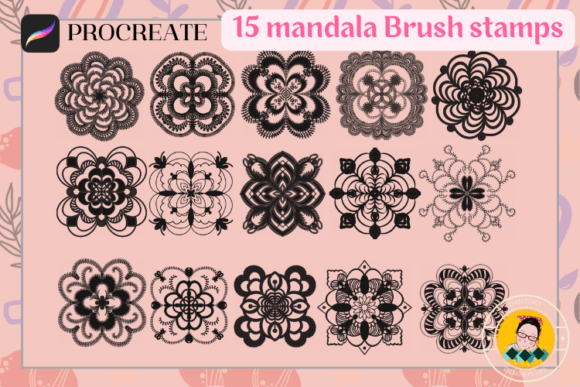
Unlock Creativity with the 15 Mandala Brush Stamp Set
In the rapidly evolving world of digital art, efficiency and aesthetic quality often go hand in hand. For artists, designers, and content creators working within the Procreate ecosystem, finding tools that bridge the gap between complex manual drawing and rapid production is essential. The 15 Mandala Brush Stamp collection represents exactly this kind of utility. It is not merely a set of digital brushes; it is a curated toolkit designed to streamline the creation of intricate patterns while maintaining the organic feel of hand-drawn art.
This article explores the practical applications, installation nuances, and creative potential of this specific brush set, offering a comprehensive guide for anyone looking to enhance their digital workflow.
The Essence of Digital Mandalas
Mandalas have long been a staple in graphic design and spiritual art, known for their symmetrical complexity and calming visual rhythm. Traditionally, creating a mandala requires patience, steady hands, and often hours of repetitive detailing. In a digital environment, replicating this symmetry can be time-consuming if one relies solely on freehand drawing tools.
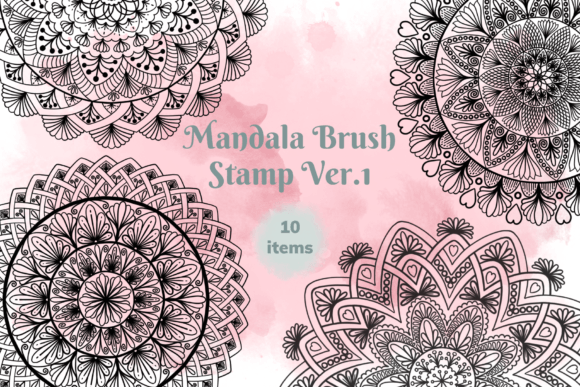
The 15 Mandala Brush Stamp addresses this challenge by providing pre-designed, high-resolution stamp elements. These are not static images but dynamic brush stamps that allow for scaling, rotation, and color manipulation. By integrating these into your Procreate library, you gain access to fifteen distinct mandala designs that can be deployed instantly. This shift from "drawing" to "stamping" fundamentally changes the pace of creation, allowing artists to focus on composition and layout rather than getting bogged down in the minutiae of every single line.
Why Choose Stamps Over Static Images?
A common misconception among new digital artists is that using stamps limits creativity. However, the versatility of the 15 Mandala Brush Stamp set proves otherwise. Unlike importing a PNG or JPEG image, which locks you into a fixed size and orientation, a Procreate stamp brush retains vector-like flexibility regarding scale and opacity.
You can resize a small mandala to cover an entire canvas or shrink a large one to act as a subtle texture element. You can change the ink color to match any palette, adjust the opacity to create watercolor-like washes, or layer multiple stamps to build depth. This flexibility ensures that the tool serves your vision rather than dictating it.
Practical Applications Across Industries
The true value of the 15 Mandala Brush Stamp lies in its adaptability across various professional and personal projects. Whether you are a seasoned graphic designer or a hobbyist starting a blog, these brushes offer tangible benefits.
- Stationery and Printables: Create beautiful planners, journal covers, and greeting cards. The symmetrical nature of mandalas makes them perfect for borders, page dividers, and decorative accents in printable products.
- Social Media Content: Instagram posts and Pinterest pins often require visually striking graphics. Using these stamps allows you to quickly generate unique backgrounds or overlay elements that stand out in a crowded feed.
- Surface Pattern Design: For those interested in textile or wallpaper design, these stamps serve as excellent base motifs. By repeating and varying the scale of the 15 included designs, you can create seamless patterns for packaging, fabric, or wrapping paper.
- Brand Identity: Small business owners can use these elements to design logos, business cards, or letterheads that convey a sense of mindfulness, balance, and artistic flair.
- Digital Illustration: Incorporate mandalas into character design, background environments, or abstract illustrations to add texture and cultural depth to your artwork.
Consider a scenario where a blogger needs to create a series of "Mindfulness Monday" posts. Instead of spending days drawing unique symbols for each post, they can utilize the 15 Mandala Brush Stamp set to vary the visuals daily, ensuring consistency in style while maintaining variety in execution.
Installation and Setup: A Step-by-Step Guide
One of the most critical aspects of using digital assets is ensuring they are correctly integrated into your software. The 15 Mandala Brush Stamp file is designed specifically for the Procreate app on iPad. While the process is generally straightforward, users sometimes encounter issues if the import steps are not followed precisely.
Standard Installation Process
To get started, you will need to download the brush set file provided upon purchase. Once the file is on your device, the goal is to move it directly into your Procreate brush library.
- Open your iPad's Files App: Navigate to the folder where you downloaded the zip file.
- Unzip the File: Tap on the file to extract the contents. You should see a file ending in
.brushset. - Import to Procreate: Tap and hold the
.brushsetfile with your finger or Apple Pencil until a menu appears. - Select "Share": From the share sheet, look for the option labeled "Open in Procreate."
- Confirm Import: If the option is visible, tap it. The app will open, and the brush set will automatically appear in your brush collection.
Troubleshooting Common Issues
If the "Open in Procreate" option does not immediately appear in the share menu, do not worry. This is a common occurrence depending on your iOS version or previous app usage history. Follow these additional steps to resolve it:
- Tap the "More" button (usually represented by three dots) at the bottom of the share menu.
- Scroll through the list of apps to find "Procreate."
- Toggle the switch next to Procreate to enable it, then return to the main share screen.
- Select "Open in Procreate" again to complete the import.
Once installed, navigate to the Brushes panel in Procreate. You will find a new category containing the 15 individual stamps. Selecting any of them will activate the tool, ready for you to tap anywhere on your canvas.
Evaluating Suitability for Your Projects
While the 15 Mandala Brush Stamp set is powerful, it is important to understand its strengths and limitations to manage expectations effectively.
Strengths and Advantages
The primary strength of this set is speed without sacrificing quality. The ability to resize and recolor instantly makes it ideal for iterative design processes. Furthermore, because these are created specifically for Procreate, they leverage the app's pressure sensitivity and tilt features, allowing for natural-looking variations even when stamping repeatedly.
Another significant advantage is the educational aspect. Beginners can study the structure of the mandalas to learn about symmetry and radial balance, using the stamps as reference points for their own freehand practice.
Considerations and Limitations
It is crucial to remember that these are stamp brushes, not vector files. While they scale well, extreme enlargement beyond the original resolution may result in pixelation, though this is rarely an issue for standard digital and print sizes. Additionally, the designs are fixed; you cannot edit the internal lines of a mandala once stamped unless you use masking techniques or convert the stamp to a selection.
For projects requiring hyper-specific customization where every curve must be altered, a vector-based approach might be more suitable. However, for 90% of graphic design, stationery, and social media tasks, the flexibility of the 15 Mandala Brush Stamp is more than sufficient.
Maximizing Creative Potential
To truly benefit from this tool, consider experimenting with layer blending modes. Try setting a mandala stamp to "Multiply" to create shadow effects, or use "Overlay" to blend it seamlessly with textured backgrounds. Combining different stamps from the set can create complex, layered compositions that look far more labor-intensive than they actually were.
Whether you are designing a poster for a yoga studio, creating a pattern for a t-shirt, or simply doodling for relaxation, the 15 Mandala Brush Stamp offers a versatile foundation. By mastering the installation and understanding the capabilities of these digital tools, you unlock a new level of productivity in your creative journey.
Ultimately, the best tool is the one that helps you create the work you envision. With its ease of use, aesthetic appeal, and broad applicability, this brush set stands out as a valuable asset for any digital artist's toolkit.