Reviving the Millennium: A Complete Guide to Y2K Elements Retro Procreate Brush Stamps
The digital art world is currently experiencing a fascinating renaissance of early 2000s aesthetics. Often referred to as Y2K style, this visual language is characterized by its nostalgic blend of futuristic optimism, vibrant colors, and distinct graphic elements like stars, sparkles, hearts, and chrome textures. For artists using the Procreate app on iPad, capturing this specific vibe has become easier than ever thanks to specialized tools like the Y2k Elements Retro Procreate Brush Stamp. This comprehensive guide will walk you through what these stamps are, why they matter in modern design, and exactly how to install and utilize them to transform your digital canvas.
Understanding the Y2K Aesthetic in Digital Art
Before diving into the technical installation, it is essential to understand the cultural and artistic context of the Y2K movement. Originating from the turn of the millennium, this aesthetic was defined by a fascination with technology, space, and a glossy, polished look. In graphic design, this translated to specific motifs: glittering stars, soft gradients, pixelated hearts, and holographic ribbons. These elements were not just decorations; they represented a hope for a shiny, high-tech future.
Today, this style has resurfaced with renewed vigor among Gen Z and Millennials who grew up during that era. It serves as a form of visual nostalgia, offering a comforting contrast to the often minimalist or brutalist trends of the late 2010s. When applied to digital illustration, Y2K elements add immediate personality and emotional resonance. They can turn a simple character sketch into a dynamic pop-art piece or elevate a social media graphic to stand out in a crowded feed.
Why Use Pre-Made Stamps Instead of Drawing from Scratch?
While drawing every star or sparkle by hand offers complete control, it can be incredibly time-consuming. This is where the Y2k Elements Retro Procreate Brush Stamp becomes an invaluable asset for both beginners and professional illustrators. These stamps are essentially pre-drawn assets embedded within a brush file. With a single tap, you can place a complex graphic element onto your canvas. This efficiency allows artists to focus more on composition, color theory, and storytelling rather than getting bogged down in repetitive detailing.
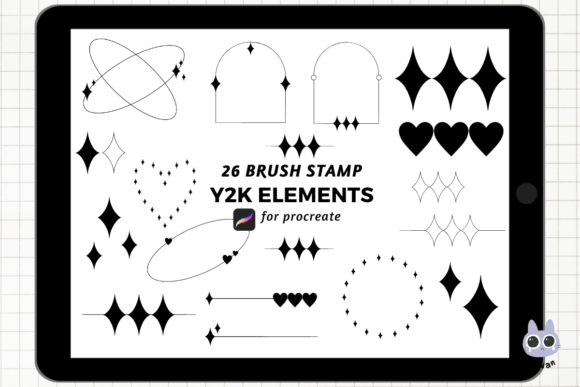
Furthermore, these stamps ensure consistency. If you need twenty identical sparkles scattered across a background, a stamp guarantees they look uniform, maintaining the professional quality of your work. The specific pack mentioned here includes 26 y2k element stamps, providing a robust toolkit that covers the most iconic symbols of the era without overwhelming the user with too many choices.
The Technical Package: What You Are Getting
When you acquire this resource, you are receiving a digital package designed specifically for the iPad ecosystem. The product comes as a ₊˚⊹♡ 1 Zipped file containing the brush set. Understanding the format is crucial for a smooth installation process. The "zipped" format (often ending in .zip) is a standard compression method used to bundle multiple files together or to protect the integrity of the brush data during download. Inside this archive lies the actual brush library compatible with Procreate.
The collection features 26 unique stamps curated to capture the essence of the retro-futuristic look. These likely include:
- Sparkle and Star Variations: From simple four-pointed stars to complex, glittering bursts.
- Heart Shapes: Ranging from pixelated hearts to soft, glowing outlines.
- Decorative Borders: Elements like ribbons, clouds, and abstract lines that frame artwork.
- Texture Overlays: Subtle grain or noise effects that mimic the screen savers of the late 90s.
These elements are not static images; they are interactive brushes. This means once installed, you can manipulate their size, opacity, and even color directly within the Procreate interface, allowing for endless customization.
Step-by-Step Installation Guide for iPad Users
One of the most common hurdles for new users is navigating the file management system on the iPad to get these brushes into the app. The process is straightforward if you follow the correct sequence. Below is a detailed walkthrough to ensure your Y2k Elements Retro Procreate Brush Stamp is ready for use.
- Download the File: Begin by downloading the zipped file to your iPad. Depending on your browser, this usually saves to the Files app under the "Downloads" folder.
- Unzip the Archive: Open the Files app on your iPad. Navigate to where the file was saved. Tap on the zipped file once. iOS will automatically extract the contents, creating a new folder with the same name but without the ".zip" extension.
- Locate the Brush Library: Open the newly created folder. You should see a file with the extension
.brushset. This is the file Procreate recognizes as a brush library. - Open in Procreate: Tap on the
.brushsetfile. A menu will appear asking which app you want to open the file with. Select Procreate. - Automatic Installation: Once you select Procreate, the app will launch (if it isn't already open) and immediately import the brushes. You do not need to click any "import" buttons inside the app; the process is seamless.
If you encounter issues, ensure that your Procreate app is updated to the latest version via the App Store, as older versions may have compatibility quirks with newer brush formats.
How to Utilize Your New Brushes Effectively
Once the installation is complete, accessing your new tools is intuitive. Open your desired canvas in Procreate and tap the Brushes icon (the circle with a dot) at the top right of the toolbar. Scroll through your brush libraries until you find the newly added folder, likely named something like "Y2K Elements" or similar to the product title.
Customizing Colors and Opacity
A common misconception is that stamps must remain black and white. In reality, these brushes inherit the color settings of your current layer. To change the color of a stamp:
- Select the Color Wheel at the bottom left.
- Pick your desired hue (e.g., a neon pink or electric blue).
- Tap the stamp brush, and it will now apply in that color.
You can also adjust the opacity slider to create faded, dreamy effects, which are quintessential to the Y2K aesthetic. For example, lowering the opacity of a star stamp creates a subtle glimmer, while keeping it at 100% makes a bold statement.
Creative Applications in Modern Workflows
The versatility of these stamps extends beyond personal doodles. They are highly relevant in various professional and creative sectors:
- Social Media Content: Designers use these stamps to create eye-catching thumbnails for YouTube, Instagram stories, and TikTok overlays. The retro vibe is currently trending, making content feel fresh yet familiar.
- Merchandise Design: Artists incorporate these elements into t-shirt prints, sticker designs, and phone cases. The clean vector-like nature of the stamps ensures they scale well for printing.
- Digital Scrapbooking: Hobbyists use these stamps to digitize old photos, adding a nostalgic border or decoration that matches the era of the photograph.
- Education and Presentation: Teachers and presenters can use these elements to make slides more engaging, particularly when discussing topics related to history, technology evolution, or pop culture.
Troubleshooting and Best Practices
Even with a straightforward process, users sometimes face minor hiccups. If the brushes do not appear after following the installation steps, try restarting the Procreate app. Occasionally, the iPad's cache needs a refresh to register the new library. Additionally, ensure that you are unzipping the file correctly; some third-party unzip apps might alter the file structure, so using the native iOS Files app is recommended.
Another best practice is organization. As your brush library grows, it helps to group these Y2K stamps into a dedicated folder within Procreate. This keeps your workspace tidy and allows you to quickly locate specific elements like "Hearts" or "Stars" without scrolling through hundreds of unrelated brushes.
Conclusion: Embracing the Retro Future
The Y2k Elements Retro Procreate Brush Stamp is more than just a digital tool; it is a bridge between the past and the present. By integrating these 26 y2k element stamps into your workflow, you gain the ability to instantly evoke a specific mood and style that resonates with a wide audience today. Whether you are a seasoned illustrator looking to speed up your detailing process or a beginner exploring the joys of digital art on your iPad, these brushes offer a fun, efficient, and creative way to express yourself.
Remember, the key to mastering any new tool is experimentation. Don't be afraid to mix colors, layer stamps over one another, and combine them with other brush types. The possibilities are limited only by your imagination. With the Procreate app on iPad and this versatile brush set, you are well-equipped to create stunning, nostalgic artwork that captures the spirit of the millennium.