10 Hairstyles Stamps for Procreate: A Practical Guide to Digital Portrait Efficiency
Digital illustration often demands a balance between artistic freedom and technical precision. For portrait artists working on the iPad, one of the most time-consuming aspects of the workflow is rendering complex hair textures. This is where specialized assets like 10 Hairstyles Stamps for Procreate become relevant. These tools are not merely decorative elements; they are functional brush sets designed to streamline the creation of high-quality portraits by providing pre-rendered hair volumes that react dynamically to input pressure.
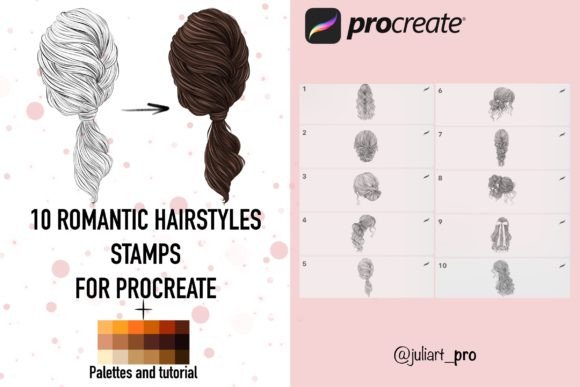
The core value proposition of this specific asset lies in its ability to reduce repetitive labor without sacrificing the organic feel of hand-drawn art. Unlike standard clip art or static images, these stamps are engineered as brushes within the Procreate ecosystem. They allow an artist to place a hairstyle with a single stroke while maintaining control over opacity, flow, and size through the Apple Pencil. When paired with the included color palettes, the workflow shifts from tedious texturing to strategic composition, enabling creators to produce polished illustrations at a significantly faster pace.
Understanding the Mechanics of Stamp Brushes
To evaluate whether 10 Hairstyles Stamps for Procreate fits your workflow, it is essential to understand how they function technically. These are high-resolution assets, typically rendered at 300 DPI, ensuring that the final output remains crisp even when printed or viewed on high-density displays. The "stamp" designation indicates that each brush contains a fixed image—specifically a distinct hairstyle—that is applied upon contact with the canvas.
What distinguishes these from simple photo overlays is their integration with Procreate's brush engine. Because they are native brushes, they respond to the pressure sensitivity of the Apple Pencil. This means that pressing harder can increase the opacity or alter the blending mode, allowing the artist to integrate the stamp seamlessly into the underlying sketch. This responsiveness is critical for creating depth, as it permits the user to soften edges or layer multiple strokes to build volume, rather than pasting a flat graphic onto the artwork.
However, this functionality comes with a specific hardware requirement. These brushes are optimized exclusively for the iPad running Procreate. They rely on the proprietary brush data structure of the app and the haptic feedback loop provided by the Apple Pencil. Consequently, they are not compatible with other digital art applications such as Adobe Fresco, Clip Studio Paint, or desktop-based software like Photoshop. Users must have an iPad and an Apple Pencil to utilize these tools effectively.
Comparative Analysis: Stamps vs. Traditional Painting Methods
When considering the adoption of 10 Hairstyles Stamps for Procreate, it is helpful to compare them against traditional hair painting techniques. The traditional method involves using textured brushes to manually render individual strands, clumps, and shadows. While this approach offers maximum control and uniqueness, it is notoriously time-intensive. Artists often spend hours refining the flow and lighting of hair, which can slow down project turnaround times significantly.
In contrast, the stamp method prioritizes efficiency. By selecting one of the ten included hairstyles, an artist can establish the primary form and texture of the hair in seconds. This does not mean the result is automated; rather, it provides a strong foundational layer. The artist can then refine the placement, adjust the color using the included swatches, and add custom details to ensure the hair matches the character's specific anatomy and lighting conditions.
Another alternative to consider is the use of vector shapes or generic clip art. These options often lack the organic imperfections necessary for realistic portraiture. They tend to look stiff and disconnected from the rest of the drawing. The 10 Hairstyles Stamps for Procreate set avoids this pitfall by utilizing raster-based, hand-painted textures that mimic natural hair flow. The inclusion of two dedicated color palettes further differentiates this product, as it solves the common problem of matching skin tones and clothing colors to the hair, ensuring a cohesive visual style.
Evaluating Workflow Speed and Quality Tradeoffs
The decision to use stamp brushes often hinges on the tradeoff between speed and customization. If an artist is working on a tight deadline, such as a commercial commission or a social media series, the speed advantage of these stamps is substantial. The ability to quickly iterate through different hairstyles allows for rapid prototyping of character designs. An artist can test five different looks in the time it would take to paint one from scratch.
However, there are limitations to consider. Because the base shape is pre-defined, extreme modifications to the hair's fundamental structure may be difficult. While the pressure sensitivity allows for some manipulation, the overall silhouette remains consistent with the original stamp design. For projects requiring highly unique, gravity-defying, or abstract hair forms, traditional painting methods might still be superior. The stamp is best suited for styles that fall within the range of the ten included variations, such as bobs, long waves, braids, or updos.
Furthermore, the reliance on the Apple Pencil creates a barrier to entry for those who do not own the specific hardware. While many professional illustrators already work within the iPad ecosystem, hobbyists or professionals who prefer desktop setups will find these assets unusable. This limitation narrows the potential user base but ensures a high level of performance for those who do meet the requirements.
Implementation and Technical Setup
For those who decide that 10 Hairstyles Stamps for Procreate aligns with their needs, the setup process is straightforward but requires attention to detail to ensure optimal results. Upon purchasing the resource, the user receives a compressed file containing the brush presets, color palettes, and instructional materials. The first step involves downloading this file to the iPad and clicking "Unpack" to extract the contents.
Once extracted, the files must be imported directly into the Procreate application. This is typically done by tapping the brush library icon, selecting the import option, and navigating to the downloaded files. It is crucial to select both the brush set (Hair 1-10) and the accompanying palettes. The palettes are designed to complement the stamps, offering a curated selection of tones that work well with the textures provided. Using external colors may result in a mismatch if the saturation or brightness levels differ significantly from the stamp's intended aesthetic.
After importing, it is advisable to test each brush on a blank canvas to verify that the pressure sensitivity is functioning correctly. Since these brushes react to the force applied by the Apple Pencil, users should experiment with light and heavy strokes to understand how the opacity and texture change. This calibration step ensures that the artist can fully leverage the dynamic capabilities of the tool before beginning a serious project.
Strategic Use Cases and Decision Factors
Determining when to utilize 10 Hairstyles Stamps for Procreate depends largely on the nature of the project and the artist's current skill set. For beginners struggling with the complexity of hair rendering, these stamps serve as an excellent educational tool. They provide a reference for how light interacts with hair volume and how clumps are formed, allowing novices to study the structure while producing acceptable results.
For experienced professionals, the utility lies in scalability. If an illustrator is managing multiple characters or needs to produce a large volume of content, these stamps act as a force multiplier. They allow the artist to focus their creative energy on facial expressions, composition, and storytelling, rather than getting bogged down in the minutiae of hair texture. This is particularly valuable in industries like concept art, character design, and editorial illustration, where iteration speed is often as important as the final polish.
Conversely, there are scenarios where these stamps may not be the right choice. If a project demands hyper-realism with every strand individually defined, or if the artistic style is heavily stylized in a way that conflicts with the pre-made textures, manual painting will yield better results. Additionally, artists who frequently switch between different software platforms may find the iPad exclusivity limiting, necessitating a search for more versatile, cross-platform resources.
Final Considerations for Purchase
Ultimately, the value of 10 Hairstyles Stamps for Procreate is found in its ability to bridge the gap between efficiency and quality. It offers a practical solution for artists who need to maintain a high standard of work without compromising their schedule. By understanding the strengths of the tool—such as pressure sensitivity and high resolution—and acknowledging its limitations regarding platform compatibility and structural flexibility, artists can make an informed decision.
The inclusion of tutorials and ready-made palettes adds significant value, reducing the learning curve and ensuring a cohesive aesthetic. However, success with these tools still relies on the artist's ability to integrate them creatively into their workflow. They are aids, not replacements for artistic judgment. For the right user, specifically those working within the Procreate ecosystem who prioritize workflow optimization, this resource represents a logical and effective investment in their digital toolkit.