Procreate Gemstone Stamps for Realistic Art
There is a distinct difference between sketching a rough circle and placing a faceted diamond that catches the light. For digital artists, fashion illustrators, and jewelry designers working in Procreate, the gap between concept and polished execution often lies in the details. Rendering realistic gemstones from scratch requires a deep understanding of light refraction, shadow play, and complex geometry. It can take hours to perfect a single stone, slowing down your workflow and draining creative energy. This is where specialized tools like Procreate Gemstone Stamps transform the process.
These brushes are not merely decorative icons; they are high-fidelity assets designed to integrate seamlessly into your digital canvas. By utilizing these stamps, you bypass the tedious technical work of drawing every facet while retaining full control over color, size, and placement. Whether you are creating a mood board for a luxury brand or illustrating a character's costume, these tools offer an immediate upgrade to your visual storytelling.
The Power of Instant Realism
The primary appeal of Procreate Gemstone Stamps is their ability to deliver photorealistic results instantly. Unlike standard shape tools that produce flat, two-dimensional forms, these brushes are engineered with depth. They simulate the way light interacts with hard surfaces, creating the illusion of three-dimensionality without requiring manual shading on every stroke.
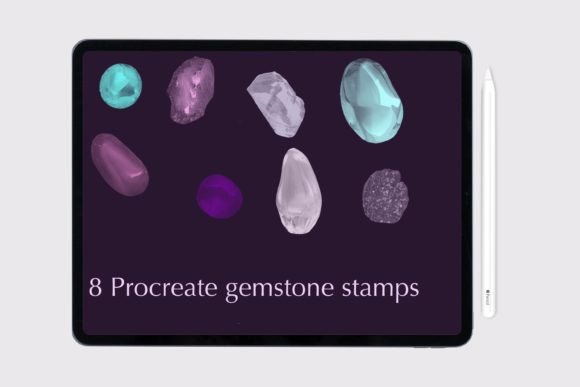
When you select one of the eight included gemstone stamps, you are accessing a pre-rendered texture that includes highlights, internal reflections, and gradient shifts. This level of detail is crucial for fashion illustration, where the sparkle of a brooch or the weight of a necklace can define the entire aesthetic of a piece. Instead of spending time wrestling with opacity sliders and layer blending modes to fake a shine, you simply tap the canvas. The result is a crisp, professional-grade element that looks as if it were painted by hand but was placed in seconds.
Key Characteristics of the Brush Set
What sets this collection apart from generic stamp packs found online? The answer lies in the quality of the source images and the customization options provided within the Procreate interface. Here is what defines the utility of these specific brushes:
- High-Resolution Textures: Each of the 8 gemstone stamps is rendered at a resolution that ensures clarity even when scaled up for large-format prints or detailed close-ups.
- True 3D Appearance: The brushes incorporate subtle gradients and specular highlights that mimic the physical properties of diamonds, rubies, sapphires, and other precious stones.
- Color Adaptability: While the base stamp provides the structure and lighting logic, Procreate’s dynamic color settings allow you to shift the hue instantly. You can turn a clear diamond into an emerald or a sapphire with a single slider adjustment.
- Seamless Integration: These stamps are designed to sit naturally on top of fabric textures, skin tones, and metallic backgrounds, avoiding the "sticker" look that plagues lower-quality assets.
Applications Across Creative Industries
The versatility of Procreate Gemstone Stamps extends far beyond simple hobbyist doodling. Professionals across various sectors leverage these tools to enhance productivity and maintain high visual standards.
Fashion Illustration and Design
For fashion illustrators, accessories are often the focal point that sells a design. A dress might be beautiful, but the statement jewelry elevates it to luxury status. Using these stamps allows designers to rapidly iterate through different accessory combinations during the sketching phase. You can quickly test how a ruby pendant looks against a velvet gown versus a silk evening wear piece without redrawing the stone each time. This speed is invaluable during tight deadlines for editorial spreads or client presentations.
Jewelry Branding and Marketing
Entrepreneurs and small business owners in the jewelry sector often struggle with product photography costs. High-end studio shoots are expensive and time-consuming. Digital mockups created with Procreate offer a cost-effective alternative. By applying these realistic gemstone stamps to custom sketches or photo-manipulated bases, marketers can create compelling social media content, catalog covers, and website banners. The 3D effect adds a tactile quality that engages viewers, making the product feel tangible even on a screen.
Educational and Tutorial Content
Art educators and content creators also benefit from these resources. When teaching digital painting techniques, instructors can focus on composition, color theory, and layout rather than getting bogged down in the minutiae of rendering individual facets. Demonstrating how to use Procreate Gemstone Stamps effectively teaches students about asset management and efficiency, skills that are critical in the modern freelance market.
Efficiency and Workflow Optimization
In the professional world, time is currency. The ability to add intricate details instantly translates directly to increased productivity. Consider the scenario of an illustrator preparing a series of ten fashion plates. If each plate requires three unique gemstone pieces, manually rendering those nine stones could consume several hours of work. With the eight-stamp set, that same task takes minutes.
This efficiency does not come at the cost of creativity. On the contrary, it frees up mental space for higher-level decision-making. Instead of worrying about the physics of light on a crystal surface, you can focus on the narrative of the illustration, the flow of the fabric, or the emotional expression of the subject. The stamps act as a foundation upon which you can build more complex compositions, allowing you to produce a higher volume of work without sacrificing quality.
Practical Implementation Tips
To get the most out of Procreate Gemstone Stamps, consider a few practical strategies during your workflow:
- Layer Management: Always place your gemstone stamps on a separate layer above your base illustration. This allows you to adjust the opacity or blend mode (such as "Overlay" or "Soft Light") later if the stone feels too harsh against the background.
- Size Variation: Don't rely on a single size. Use the scale tool to vary the dimensions of the stamps slightly. In real life, no two stones are perfectly identical in size, and varying them adds naturalism to your arrangement.
- Color Harmonization: While the stamps have built-in lighting, ensure the base color matches the temperature of your scene. A warm sunset scene might require slightly warmer highlights on the gems compared to a cool, moonlit setting.
- Rotation and Perspective: Rotate the stamps to match the angle of the object they are attached to. A ring viewed from the side needs a different orientation than one viewed head-on to maintain the illusion of 3D form.
Final Thoughts on Digital Asset Selection
Selecting the right digital tools is a strategic decision for any creator. The inclusion of Procreate Gemstone Stamps in your toolkit represents a move toward smarter, faster, and more visually impactful art creation. These eight brushes provide a robust solution for adding luxury and detail to your projects without the steep learning curve of advanced rendering techniques.
Whether you are a seasoned professional looking to streamline your production pipeline or an enthusiast eager to elevate your illustrations, these tools offer immediate value. They bridge the gap between imagination and execution, allowing you to focus on what matters most: your unique artistic vision. By integrating these realistic, 3D-ready assets into your workflow, you ensure that every project benefits from the sparkle and sophistication of true craftsmanship.