Paper Texture and Cute Brush Procreate: A Practical Evaluation
In the digital illustration landscape, the line between vector precision and organic imperfection often defines the emotional resonance of a piece. For professionals working within the iPad ecosystem, finding assets that bridge this gap without compromising workflow efficiency is a constant challenge. The Paper Texture and Cute Brush Procreate set attempts to solve this by combining tactile realism with whimsical utility. This collection is not merely a bundle of strokes; it is a curated toolkit designed for creators who need to produce high-quality graphic designs, from wedding stationery to social media quotes, while maintaining a handcrafted aesthetic.
The Composition of the Collection
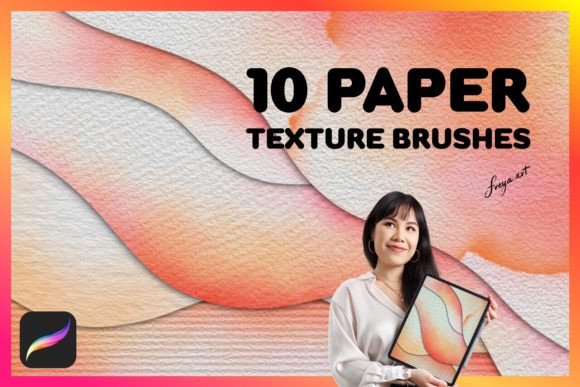
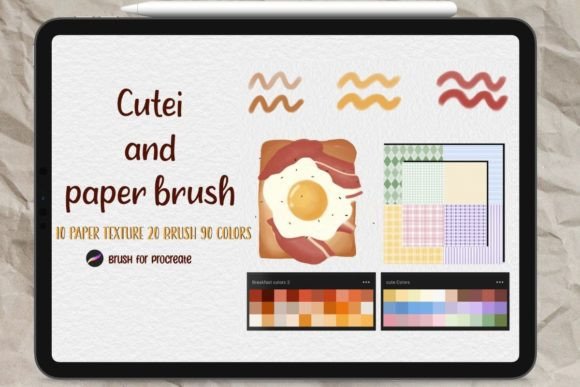
To understand the value proposition of this asset pack, one must first dissect its contents. The set comprises a total of 120 items, organized into distinct functional categories. At its core are 20 custom brushes under the "CUTEI" designation. These are not generic markers but specialized tools engineered to mimic specific artistic effects. Complementing these are five dedicated paper textures specifically optimized for drawing workflows and another five tailored for graphic design applications.
Beyond the brushes and textures, the package includes a robust color palette consisting of 90 pre-mixed colors and three swatch sets. This inclusion addresses a common friction point in digital art: color selection. By providing a cohesive palette, the resource ensures that the final output maintains visual harmony, which is critical when creating logos or greeting cards where brand consistency matters. The sheer volume of 120 items suggests a comprehensive approach, aiming to cover various stages of the creative process rather than just the initial sketching phase.
Technical Specifications and Compatibility
From a technical standpoint, compatibility is non-negotiable for digital artists. This resource is explicitly designed for the iOS APP Procreate version 5.0 and above. This requirement ensures access to advanced features such as wet mix, streamlining, and complex grain settings that define modern digital painting. Users running older versions will find the files incompatible, so verifying software updates before installation is a necessary step. The file structure allows for easy importation, enabling immediate use within an artist's existing workspace without the need for third-party converters or plugins.
Evaluating the Brush Dynamics
The 20 "CUTEI" brushes form the heart of this collection. In practice, these brushes exhibit a dual nature: they offer the softness required for delicate elements like floral arrangements on wedding invitations, yet possess enough opacity control for bold lettering in logo design. The brush engine utilizes texture maps to simulate the interaction between bristles and surface, creating natural variation in stroke width and edge definition.
When testing these brushes for quote creation, the response time is notably snappy. There is minimal lag, even when using stylus pressure to vary line weight. This responsiveness is crucial for professionals who rely on speed during client revisions. The "cute" aspect of the naming convention refers less to childish aesthetics and more to the rounded, approachable geometry of the stroke ends. This makes them particularly effective for branding projects targeting younger demographics or lifestyle niches where friendliness is a key attribute.
Texture Integration and Realism
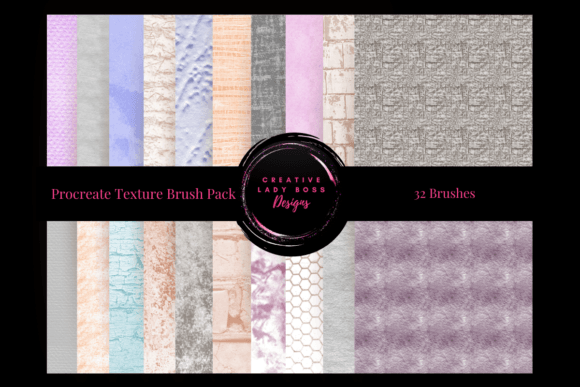
The separation of textures into two groups—five for drawing and five for graphic design—is a strategic decision that enhances usability. Drawing textures typically feature higher noise levels and irregular grain patterns, mimicking watercolor paper or rough canvas. These are ideal for adding depth to illustrations where light and shadow play a significant role. Conversely, the graphic design papers offer a smoother finish with subtle grain, ensuring that text remains legible and logos retain their sharpness when scaled.
Applying these textures in Procreate is straightforward. They can be used as background layers or applied via blend modes like "Multiply" or "Overlay" to give flat vector-style art a tangible feel. This capability allows designers to elevate simple compositions into pieces that appear photographed rather than rendered, a quality highly valued in the current market for handmade goods and artisanal branding.
Workflow Efficiency and Color Management
One of the most underrated aspects of this set is the inclusion of 90 colors and 3 swatches. In professional environments, time spent selecting colors is time lost. These palettes appear to be curated for cohesion, likely utilizing analogous and complementary schemes that work well together. For instance, a marketer creating a series of greeting cards can select a base color from the swatch and immediately find matching accents without resorting to external color pickers.
The practical application of these colors extends beyond personal art. Entrepreneurs selling digital templates can utilize these presets to ensure their products look consistent across different devices. Educators teaching digital art can assign projects using these specific palettes to teach students about color theory within a controlled environment. The reliability of the color profiles means that what is seen on the iPad screen translates reasonably well to print, provided standard color management practices are followed.
Real-World Application Scenarios
Who benefits most from the Paper Texture and Cute Brush Procreate set? The primary beneficiaries are freelancers and small business owners operating in the creative sector. A wedding planner designing bespoke stationery can use the textured papers to create mockups that convey luxury and tradition. A blogger needing unique headers for articles can leverage the cute brushes to add personality without hiring a designer.
Furthermore, educators and publishers find value in the versatility of the assets. Creating educational materials often requires engaging visuals that do not distract from the content. The balanced nature of these brushes allows for illustrations that are detailed yet uncluttered. For publishers producing children's books or lifestyle magazines, the ability to generate consistent, high-quality imagery quickly is a significant advantage.
Limitations and Considerations
While the collection offers substantial value, it is not without limitations. The "cute" aesthetic may not align with every brand identity. Corporations requiring stark, minimalist, or industrial designs might find the rounded edges and soft textures inappropriate for their specific needs. Additionally, while the 90-color palette is extensive, niche projects requiring specific Pantone matches will still necessitate manual color adjustment.
Another consideration is the learning curve for new users. While Procreate is user-friendly, mastering the interplay between brush settings, texture layers, and color swatches requires practice. Beginners might initially struggle to achieve the desired effect if they do not understand how to adjust opacity and flow settings to match the texture intensity. However, for those with basic proficiency in digital art, the transition is seamless.
Long-Term Value and Versatility
The long-term viability of this asset pack lies in its adaptability. Unlike trend-specific filters that age poorly, the fundamental principles of paper texture and brush dynamics remain relevant. As digital art continues to evolve towards hyper-realism and hybrid techniques, having a library of reliable, organic tools becomes increasingly important. The ability to mix these brushes with other Procreate features ensures that the set does not become obsolete quickly.
For serious hobbyists looking to monetize their skills, this collection provides a professional-grade foundation. It reduces the barrier to entry for high-end design work, allowing creators to focus on composition and concept rather than technical setup. Whether creating a single logo or a full suite of marketing materials, the Paper Texture and Cute Brush Procreate set offers a balance of creativity and utility that justifies its place in a professional toolkit.
Ultimately, the decision to integrate this resource depends on the specific goals of the creator. If the objective is to produce warm, inviting, and textured digital art efficiently, this collection delivers on its promise. It transforms the tablet screen into a virtual studio, complete with the tactile feedback of traditional media, empowering users to bring their vision to life with confidence and precision.