Kawaii Eyes Stamps for Procreate X 20: A Practical Guide to Instant Digital Art
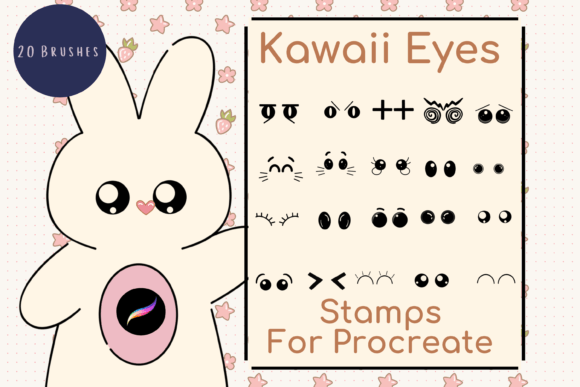
Creating charming, expressive characters or adding a touch of whimsy to your digital designs often comes down to one critical element: the eyes. In the world of Kawaii art, the eyes are not just features; they are the soul of the character, conveying emotion, personality, and style in an instant. For artists and creators using the iPad, Kawaii Eyes Stamps for Procreate X 20 offers a streamlined solution to this creative challenge. This collection consists of twenty unique, hand-drawn stamp brushes designed specifically to integrate seamlessly into your digital workflow, allowing you to bypass the tedious process of drawing perfect eyes from scratch every single time.
These are not static images but dynamic digital brushes. Once installed, they function as part of your Procreate toolkit, ready to be stamped onto any canvas with a single tap of your Apple Pencil. The versatility of these tools lies in their adaptability. Every brush in the pack can be resized and recolored to match your specific project needs, ensuring that whether you are designing a tiny icon or a large wall mural, the elements fit perfectly without losing quality.
Why Artists Choose Hand-Drawn Stamp Brushes
The primary appeal of Kawaii Eyes Stamps for Procreate X 20 is efficiency without sacrificing the organic feel of hand-drawn art. Many digital artists struggle with the "blank canvas syndrome," where starting a new illustration feels overwhelming. By having a library of pre-made, high-quality eye styles, you can jump straight into the composition phase. Instead of spending ten minutes refining the curve of an eyelid, you can spend that time developing the story behind the character or refining the color palette.
Furthermore, these brushes maintain a consistent aesthetic. When working on a series of illustrations—perhaps for a children's book or a line of merchandise—consistency is key. Drawing the same style of eye repeatedly by hand can lead to subtle variations that might break immersion. Using a stamp brush ensures that every character in your series shares the same distinct visual language, creating a cohesive brand identity or artistic style.
Real-World Applications for Creators and Entrepreneurs
The utility of these digital assets extends far beyond personal doodling. For small business owners and entrepreneurs, time is a currency, and these tools help maximize productivity. Consider the scenario of a Print on Demand (POD) seller. You need to create dozens of unique t-shirt designs featuring cute characters. With Kawaii Eyes Stamps for Procreate X 20, you can rapidly prototype different expressions and character combinations. You can mix and match body shapes with various eye styles to test which designs resonate most with your audience before committing to production.
For scrapbookers and card makers, the transition from physical to digital crafting has opened up new possibilities. Imagine creating custom greeting cards for a friend's birthday. You can design a layout on your iPad, add a personalized message, and then use these stamps to give your digital avatar a cheerful expression. Because the files are digital, you can print them at home on high-quality cardstock or send them directly to a professional printer for wrapping paper or invitations. The ability to resize the stamps means you can use a massive eye as a focal point on a poster or shrink it down to a tiny detail on a sticker sheet.
Marketers and social media managers also find value in these resources. Social platforms thrive on visual content, and cute, engaging graphics stop the scroll. Creating custom banners, Instagram stories, or blog headers becomes significantly faster when you have a go-to set of expressive elements. You can quickly generate fresh content that aligns with current trends or seasonal themes, simply by changing the colors of the eye stamps to match a holiday palette or a brand campaign.
Understanding the Technical Workflow
To get the most out of Kawaii Eyes Stamps for Procreate X 20, it is essential to understand the technical requirements and installation process. These are specialized digital brushes that operate exclusively within the Procreate app on an iPad. They will not work on desktop computers, Android tablets, or other graphic design software. To use them effectively, you must have an iPad with the Procreate app installed and an Apple Pencil for precise control.
The installation process involves a few straightforward steps that ensure the files are accessible within your creative environment. First, you need a platform to download the zip file containing the brushes, such as iCloud Drive or Dropbox. Once downloaded, you will need a utility like iZip to unzip the archive. Inside, you will find the Procreate brush set file. Tapping on this file triggers an automatic import into Procreate, where the brushes appear in a named folder within your brush library. From there, they are ready to be selected, resized using the brush resize tool, or manipulated with the move and resize tool to fit your canvas perfectly.
Considerations Before Downloading
Before integrating these tools into your workflow, consider your current hardware and skill level. If you do not own an iPad or an Apple Pencil, these brushes will remain unusable files on your device. It is crucial to verify your equipment compatibility to avoid frustration. Additionally, while the brushes provide the base shape, the final look depends on how you apply them. Users should be comfortable with basic layer management and color adjustment in Procreate to fully customize the stamps. For instance, knowing how to change blending modes or adjust opacity can transform a standard eye stamp into something glowing or shadowed, adding depth to your artwork.
Another factor to consider is the licensing and intended use. While these brushes are excellent for DIY projects and commercial goods like printed items, always review the specific license agreement provided with the download. Understanding whether you can sell the raw brush files or only the artwork created with them is vital for professional creators. Generally, these packs are sold for the creation of derivative works, meaning the end product (the t-shirt, the card, the illustration) is yours to sell, but the brush file itself remains the intellectual property of the creator.
Expanding Your Creative Possibilities
The true power of Kawaii Eyes Stamps for Procreate X 20 lies in its ability to spark creativity rather than limit it. When you remove the barrier of technical difficulty, you free yourself to experiment. Educators can use these tools to teach digital art concepts to students, showing them how to manipulate size, color, and placement to create emotion. Hobbyists can explore character design without needing years of traditional drawing training. Freelancers can offer quick turnaround times for client projects involving character illustration or branding.
Whether you are wrapping a gift with custom-printed paper, designing a wall art piece for your home, or launching a new line of stationery, these hand-drawn digital brushes serve as a reliable foundation. They bridge the gap between the desire to create and the ability to execute, turning complex artistic tasks into manageable, enjoyable steps. By incorporating these stamps into your toolkit, you gain a versatile asset that supports both personal expression and professional growth in the digital age.