Delight Procreate Color Palette: Elevate Your Digital Artwork
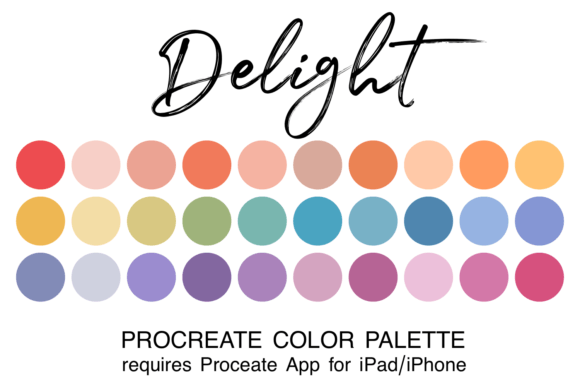
Creating artwork in Procreate is easier and more fun when you have a coordinated or themed color palette at your fingertips. Many digital artists, from hobbyists to professionals, often find themselves stuck in the "color selection loop," spending valuable creative energy trying to match hues rather than focusing on composition and brushwork. The Delight Procreate Color Palette is designed specifically to solve this friction point. By providing a curated collection of 30 harmonious colors in a single ".swatch" file, it allows you to streamline your workflow and dive straight into the art creation process without the hassle of hunting for the perfect shade.
The Challenge of Color Selection in Digital Art
One of the most common hurdles for artists using the Procreate app is the overwhelming freedom of choice. While having access to millions of colors is powerful, it can also lead to decision paralysis. When starting a new illustration, character design, or landscape, many users struggle to establish a cohesive mood. Inconsistent color choices can make an artwork feel disjointed, while spending too much time adjusting saturation and hue can break your creative flow.
This challenge is particularly acute for beginners who are still developing an eye for color theory. Even experienced illustrators often spend hours creating custom palettes before they even lay down their first stroke. The goal is not just to pick pretty colors, but to select a set that works together to tell a story or evoke a specific emotion. This is where a pre-curated resource becomes an essential tool in your digital asset library.
What Is the Delight Procreate Color Palette?
The Delight Procreate Color Palette is a specialized digital asset created to enhance your painting experience on iPad and iPhone. It consists of 30 distinct colors carefully selected to work in harmony with one another. Unlike random color generators, these swatches are chosen based on established principles of color theory, ensuring that any combination you use will result in a visually pleasing outcome.
These colors are packaged in the native ".swatch" format, which is the standard file type for importing custom palettes directly into the Procreate application. This means there is no need for complex conversions or third-party software; the file is ready to integrate seamlessly into your existing setup. Whether you are working on a whimsical children's book illustration, a vibrant UI design, or a moody atmospheric piece, this palette offers a versatile foundation that supports various artistic styles.
How Curated Palettes Transform Your Workflow
Integrating the Delight Procreate Color Palette into your routine addresses several critical needs for modern digital artists. First and foremost, it saves time. By eliminating the need to manually mix colors from scratch, you can focus your mental energy on the structural elements of your art, such as lighting, form, and storytelling.
Secondly, it ensures consistency. A major benefit of using a fixed set of 30 colors is that your artwork maintains a unified look throughout the entire project. You avoid the common pitfall of introducing clashing tones that distract the viewer. Instead, the palette guides your hand toward combinations that naturally balance each other, resulting in a more professional finish.
Furthermore, having a reliable palette boosts confidence. For those who feel intimidated by a blank canvas, knowing that a solid color scheme is already waiting for you can be incredibly encouraging. It acts as a safety net, allowing you to experiment with bold strokes and dynamic compositions without worrying about the underlying color relationships.
Step-by-Step Guide to Installing Your Palette
To get started with the Delight Procreate Color Palette, you must ensure that the Procreate app is installed on your iPad or iPhone. Without the app, the swatch file cannot be utilized. Once your device is ready, follow this straightforward process to import your new assets:
- Download the File: Begin by downloading the zipped file containing the palette to your device. Ensure it is saved in the "Downloads" folder within your Files app.
- Unzip the Archive: Open the Files app and locate the downloaded zip file. Tap on it to unzip the contents. You should now see the individual ".swatch" file.
- Import the Swatch: Click directly on the swatch filename. iOS will recognize the file type and automatically prompt you to open it with Procreate. Confirm the action, and the palette will instantly be added to your app's library.
- Locate the Palette: Launch the Procreate app. To access your new colors, tap the colored dot located in the top right corner of the screen. Scroll through your list of palettes until you find the newly imported "Delight" palette.
- Set as Default (Optional): If you plan to use this palette frequently, you can set it as your default. This ensures that every time you start a new canvas, these 30 curated colors are immediately available to you.
Practical Applications for Different Artists
Different users may approach the Delight Procreate Color Palette in unique ways depending on their artistic goals and experience levels.
For Beginners: New users often benefit from treating the palette as a strict guideline. By limiting yourself to the provided 30 colors, you learn how to create depth and variety using a restricted range. This exercise helps build a stronger understanding of value and contrast without the distraction of infinite color options. It is an excellent way to practice fundamental skills like shading and highlighting.
For Intermediate Artists: Those with some experience might use the palette as a base layer. You can take the core colors and slightly adjust the opacity or blend modes to create variations. This approach allows you to maintain the harmony of the original theme while adding your personal touch to the final piece.
For Professionals: Professional illustrators often use curated palettes like the Delight Procreate Color Palette to speed up the sketching and blocking-in phases. During tight deadlines, having a go-to palette ensures that the initial color study looks polished and cohesive, making the rendering process significantly faster. It serves as a reliable reference point that keeps the project on track.
Maximizing Your Creative Potential
The true power of the Delight Procreate Color Palette lies in its ability to remove technical barriers so you can focus on creativity. By adopting this resource, you are investing in a smoother, more enjoyable artistic journey. Whether you are creating social media graphics, concept art for games, or personal journal entries, having a dedicated set of colors transforms the way you interact with your digital tools.
Remember that a great palette is not just about the colors themselves, but about the freedom they provide. With the Delight Procreate Color Palette, you gain the confidence to paint boldly and the efficiency to produce high-quality work consistently. Download the file, install it today, and let your imagination run wild with a color scheme that truly delights.