Freebie Stars and Sparkles: Unlocking Creative Potential with Custom Brushes
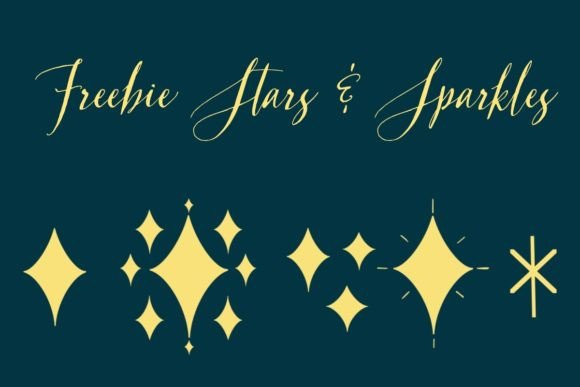
In the vast digital landscape of graphic design and digital art, tools are often the difference between a good idea and a masterpiece. Sometimes, that tool is a complex software suite, but other times, it is something as simple and specific as a custom brush. Recently, I found myself in need of a very particular aesthetic: sparkly stars. The search for the perfect effect led to the creation of a new resource, which we are excited to share as our latest freebie: Stars and Sparkles. This article explores not just the download itself, but the broader context of why custom brushes matter, how they function within modern creative workflows, and how you can manipulate them to suit your unique vision.
The Magic of Custom Digital Brushes
For beginners entering the world of digital illustration, the default brush library provided by software like Adobe Photoshop, Procreate, or Clip Studio Paint can feel overwhelming yet simultaneously limiting. While standard brushes cover the basics—hard edges, soft airbrushes, and textured pencils—they rarely capture the specific whimsy or intricate detail required for fantasy art, greeting cards, or social media graphics. This is where custom brushes become indispensable.
A custom brush is essentially a pre-programmed set of rules that dictates how pixels are laid down on a canvas. When I created the Stars and Sparkles brush, the goal was to solve a specific problem: creating a magical, celestial atmosphere without spending hours drawing individual star shapes by hand. By encapsulating these shapes into a single brush tool, the artist gains speed and consistency. This concept applies broadly to modern creativity; whether you are a professional designer working on a brand identity or a hobbyist decorating a digital scrapbook, specialized tools allow you to focus on composition and color rather than repetitive technical tasks.
Why "Sparkle" Matters in Visual Communication
There is a psychological component to using elements like stars and sparkles. In visual communication, these elements signal magic, celebration, hope, and attention. They draw the eye and add a layer of texture that flat colors cannot achieve. Think about holiday marketing campaigns, fantasy book covers, or even user interface designs for apps that want to feel playful and engaging. The ability to instantly apply a "sparkle" effect can elevate a project from mundane to memorable.
However, a common misunderstanding among new users is that a brush is a static stamp. Many assume that once a brush is downloaded, it will always look exactly the same every time you click. This assumption limits the potential of the tool significantly. The true power of the Stars and Sparkles freebie lies in its dynamic nature. It is not merely a picture of a star; it is a system designed to react to your input.
Diving Deep into Brush Settings and Dynamics
When you download the Stars and Sparkles brush pack, you are receiving more than just a shape file. You are gaining access to a customizable engine. To truly harness the potential of this freebie, one must understand the settings that control how the brush behaves. These settings vary slightly depending on the software you use, but the core principles remain consistent across most platforms.
Shape Dynamics and Rotation
One of the first things to check in your brush settings is Shape Dynamics. For a star brush, size variation is crucial. If every star were the exact same size, the result would look mechanical and unnatural. By adjusting the size jitter based on pen pressure (for tablet users) or stroke length, you create a sense of depth. Larger stars appear closer, while smaller ones recede into the background, mimicking the actual night sky.
Furthermore, rotation is key for sparkle effects. A static star pointing upward looks rigid. By enabling random rotation or controlling it via direction, each stroke creates a chaotic, twinkling array of points. This setting transforms a simple line into a burst of light. When I built this brush, I specifically tuned the rotation settings to ensure that no two strokes look identical, preserving the organic feel of hand-drawn art.
Scattering and Density
Another vital setting is Scattering. This controls how far apart the individual star shapes are placed along the path of your stroke. High scattering creates a wide, diffuse cloud of stardust, perfect for backgrounds. Low scattering keeps the stars tight together, ideal for outlining text or creating concentrated beams of light.
Practical Example: Imagine you are designing a birthday invitation. You might want a thick border of stars. You would lower the scattering and increase the size. Conversely, if you are adding a subtle glow behind a character's wand, you would increase the scattering and reduce the opacity, allowing the stars to fade out naturally. Understanding these variables allows you to adapt a single brush to dozens of different scenarios.
Integrating Sparkles into Your Workflow
The utility of the Stars and Sparkles brush extends beyond simple decoration. In a business context, such assets can streamline the production of marketing materials. Social media managers often need to create eye-catching posts quickly. Having a library of high-quality, customizable brushes means you can produce professional-grade graphics in minutes rather than hours.
In education, these tools serve as excellent examples of how technology empowers creativity. Teachers can demonstrate how changing a single variable in a digital tool alters the final output, teaching students about cause and effect in a visual medium. For the independent creator, it represents a way to build a personal style. By mastering the settings of free resources, you learn to tweak and modify them until they fit your specific artistic voice perfectly.
Common Pitfalls to Avoid
While these brushes are powerful, there are a few mistakes to watch out for. The most common is overuse. Adding sparkles to everything can make an image look cluttered and cheap. Use them strategically to highlight focal points. Another pitfall is ignoring the layer blending modes. Often, simply painting white stars on top of an image looks flat. By changing the layer mode to Screen, Overlay, or Color Dodge, the stars interact with the colors beneath them, creating a genuine glowing effect that integrates seamlessly with the artwork.
Conclusion: Empowering Your Creativity
The creation of the Freebie Stars and Sparkles brush was born out of a simple need, but it highlights a fundamental truth about digital art: the right tool can unlock new levels of expression. Whether you are a seasoned professional looking to expand your toolkit or a beginner taking your first steps into digital illustration, understanding how to manipulate brush settings is a skill that pays dividends.
Don't just accept a brush at face value. Dive into the settings, experiment with pressure sensitivity, rotation, and scattering, and discover how a little bit of code can transform your canvas into a universe of possibility. By checking the brush settings and learning how they react, you move from being a passive consumer of digital assets to an active creator who shapes the tools to their will. So, download the freebie, open your favorite software, and let your work shine with a little extra sparkle.